
Are you an artist or creative looking for a portfolio solution to showcase your work on WordPress? Whether you’re a designer, artist, photographer, or creative freelancer, creating an online portfolio of work is likely to be a necessity for you. However, with so many available options for how to do this, it can be difficult to know where to start.
If you’re using WordPress, there are various third-party portfolio plugins available. WordPress portfolio plugins add functionality to showcase visual work through customizable galleries and layouts. These plugins enable users to display projects without changing themes.
FooGallery is owned and maintained by FooPlugins. When we mention or recommend FooGallery in this article, that relationship may influence how the product is covered; product details should be checked against current documentation, demos, pricing, and release notes.
Portfolio plugins vary in how they handle responsive images, lazy loading, gallery layouts, filtering, video, and ecommerce. The right option depends on the type of work you display, how visitors need to browse it, and which features your site actually requires. Understanding which features matter is key to creating a portfolio that suits your work and visitors. In this article, we compare eight WordPress portfolio plugins by layouts, media support, browsing features, integrations, and current pricing.
WordPress Posts vs Portfolio Items
When building your creative showcase, understanding the distinction between standard posts and portfolio items makes a crucial difference. A WordPress post is the built-in blog post content type. A portfolio item is usually a custom post type introduced by a 3rd party plugin or script.
WordPress posts are designed for chronological publishing and normally appear in blog archives and feeds. Some portfolio plugins use a separate custom post type to keep projects apart from blog content. Others build portfolios from galleries, pages, or blocks.
A separate portfolio content type can make projects easier to organise by client, project type, or creative discipline. It does not automatically improve site performance. Performance depends on the images, theme, plugin, hosting, caching, and gallery configuration.
Choose posts when you’re documenting your creative process, sharing industry insights, or building thought leadership content. Reserve portfolio items for showcasing finished projects, case studies, and visual galleries that demonstrate your professional capabilities.
Essential Portfolio Plugin Features
Before diving into specific plugins, let’s establish the non-negotiable features your portfolio needs:
- Lazy loading reduces initial page load time.
- Responsive layouts adapt to all devices.
- Multiple gallery layouts include grid, masonry, and slider options.
- Filtering allows category sorting, making it simple for visitors to browse specific project types or styles in your portfolio.
- Lightbox displays full-size images without page reloads, keeping viewers engaged with your work rather than waiting for new pages to load.
Portfolio sites face unique performance challenges since they often need to have a combination of high-resolution images, complex layouts, and interactive elements. These ensure that the portfolio is visually aesthetic, which is a key factor for any creative website.

Image-heavy portfolio pages can be demanding because they combine large media files, layouts, and interactive features. Plugin choice is only one factor. Image dimensions, file sizes, theme code, hosting, caching, and gallery configuration also affect the finished page, so test shortlisted options on your own setup.
8 WordPress Portfolio Plugins Compared
The following plugins take different approaches to portfolio layouts, gallery workflows, media, ecommerce, and templates.
Portfolio Plugin Comparison Table
| Plugin | Best For |
| FooGallery | Responsive image portfolios with a Free-to-PRO upgrade path |
| Visual Portfolio | Dynamic layouts |
| Envira Gallery | Drag-and-drop creation |
| Modula | Masonry grids |
| WP Portfolio | Website portfolios |
| Imagely | Ecommerce integration |
| GridKit Portfolio | Interactive animations |
| Essential Grid 3 | 60+ grid templates |
Below you will find a summary of each plugin’s layouts, portfolio workflows, current pricing, and relevant integrations. The linked July 2026 performance comparison covers FooGallery, Envira, and Modula in one 10-image test setup; it is not a benchmark of all eight plugins on this page. Plus, we look at general functionality, customization features, and integration with page builders to give you a solid understanding of your options.
July 2026 Update : we have created a new post outlining performance testing for the top WordPress gallery plugins.
1. FooGallery
FooGallery is a WordPress gallery plugin used on more than 100,000 active sites. It includes responsive gallery layouts and a free Portfolio layout, with optional PRO upgrades for video, filtering, search, ecommerce, watermarking, and image protection.
Best for: photographers, designers, agencies, and portfolio sites that want responsive image galleries, a free starting point, and room to add more advanced gallery workflows later.
FooGallery can be used as a WordPress portfolio plugin when you need responsive gallery layouts, media organization, and a Free-to-PRO upgrade path. The plugin supports JPEG, PNG, GIF, and WebP formats. WooCommerce integration enables direct image sales.
FooGallery’s portfolio features include:
- Lazy loading and responsive image output help avoid loading every full-size image at once. Actual page speed still depends on image dimensions, file sizes, hosting, theme, caching, and gallery configuration.
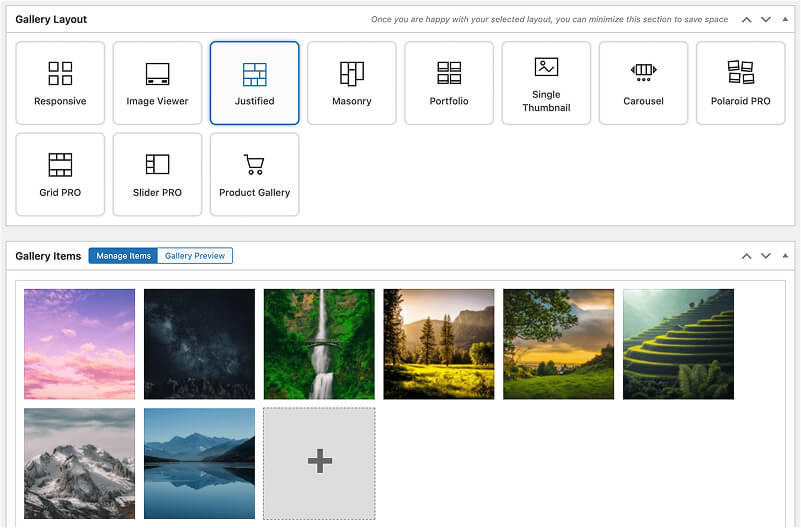
- A choice of Free and PRO gallery layouts, including Portfolio, Masonry, Justified, Carousel, Grid, Slider, Polaroid, and Spotlight. Available layouts depend on the selected plan.
- FooGallery PRO Expert offers advanced customization with a multi-level filtering system, the ability to add custom captions to thumbnail images and the lightbox, and video support for mixed-media portfolios. You can also enable deep linking for your galleries.

- The plugin’s watermarking and right-click protection features safeguard your creative work from unauthorized use, particularly valuable for professional photographers and artists selling their work online. These security features integrate seamlessly with the PRO Commerce plan’s WooCommerce functionality
- The plugin is supported by popular page builders, and you can customize your portfolio further with custom CSS options.
- The PRO Commerce plan integrates with WooCommerce and includes watermarking, right-click image protection, and Gallery Blueprints. FooGallery Whitelabel is available separately.











FooGallery is available in three different plans, each with progressively more features, to accommodate different needs and budgets. The PRO Starter plan is available from $49.99 per year, but creators and photographers are likely to prefer the PRO Expert plan, which allows for video support, multi-level filtering, portfolio search, and custom captions to give more control over the presentation of your work.
FooGallery WordPress gallery plugin
Is FooGallery right for your portfolio?
Start with FooGallery Free if you need a responsive image portfolio and want to test the layout on your own site. Choose PRO Expert when your portfolio needs video, filtering, search, EXIF metadata, pagination, or larger media workflows. Choose PRO Commerce when you also need WooCommerce selling, product galleries, watermarking, or image protection.
2. Visual Portfolio

Visual Portfolio is a WordPress portfolio plugin that offers multiple layouts, including masonry, grid, and carousel options.
Best for: agencies creating dynamic portfolios with advanced filtering.
This plugin stands out with its deep Gutenberg integration, making it incredibly intuitive for users already familiar with WordPress’s block editor. The current pricing comparison lists Gutenberg support, lazy loading, AJAX filtering, custom CSS, and multiple layouts. Check the plan comparison for current Free and Pro boundaries.
The plugin’s AJAX-powered filtering creates smooth transitions without page reloads, maintaining visitor engagement throughout their browsing experience.
- Premium features unlock advanced hover effects and additional layout variations.
- Supports video portfolios from YouTube, Vimeo, and self-hosted sources.
- The current feature comparison lists an Instagram feed and Pinterest sharing in the lightbox. Check the plan comparison for availability.
Visual Portfolio focuses on portfolio layouts and Gutenberg integration. Compare its current features and pricing with FooGallery based on the layouts and workflows your site needs. Visual Portfolio offers a free version. On 10 September 2026, its pricing page listed Personal at $49 for 1 website, Freelancer at $99 for 5 websites, and Studio at $249 for unlimited websites. Check the current pricing page for the billing term and any later changes.
3. Modula

Modula is a WordPress portfolio plugin specializing in customizable masonry grid layouts with drag-and-drop simplicity.
Best for: non-technical users wanting customizable masonry grids.
Modula is a WordPress gallery solution for ‘non-technical users’, which could apply to users who need a portfolio. It has striking customizable masonry grid gallery templates, or you can specify a height for your gallery and the plugin will arrange your images within the space defined. This makes it an easy-to-use option.
Modula’s current pricing page lists Unlimited Image CDN on the Trio plan. The actual performance benefit depends on the site and should be tested using the same images, theme, hosting, and cache configuration. Plan availability differs: password protection is listed on Trio and higher, while watermarking, white-labeling, and pagination are listed on Business.
Modula’s Starter plan currently costs $39 for the first year and renews at $78 per year. The Trio plan, which includes unlimited image optimisation and CDN usage, costs $69 for the first year and renews at $138 per year.
Pricing note: Modula, Envira, and Imagely currently advertise introductory first-year prices that increase at renewal. FooGallery’s standard one-site annual plans currently renew at the same listed annual price. Prices and plan details checked against rendered first-party pages on September 10, 2026. Introductory offers, renewal prices, taxes, currencies, coupons, regional pricing, upgrades, and account-specific offers may differ. Recheck the linked first-party pricing page before purchase.
4. Envira Gallery

Envira Gallery is a WordPress portfolio plugin featuring intuitive drag-and-drop gallery building for quick setup.
Best for: creative professionals needing drag-and-drop gallery building.
Envira Gallery is another popular, user-friendly WordPress portfolio and gallery plugin. Some of its notable features include an easy-to-use drag-and-drop gallery builder, pre-built (but customizable) gallery templates, and responsive mobile-friendly display.
The current plan comparison lists Social Sharing on Pro and Instagram Galleries on Plus. Check the current plan table before choosing either feature. Plus, Envira Gallery’s watermarking system applies custom branding to protect your work while maintaining image quality. And when it comes to monetization, Envira doesn’t stop at protection – WooCommerce integration enables print sales and digital downloads directly from your galleries.
Envira’s Basic plan currently costs $39.50 for the first year and renews at $79 per year. Its Pro plan, which includes WooCommerce integration, image downloads, image compression, and other advanced features, costs $99.50 for the first year and renews at $199 per year. The latter option also includes an image compression tool to help optimize gallery images. Envira and FooGallery PRO Commerce both include commerce-related features, but their plan structures and specific capabilities differ. Check each product’s current documentation before choosing.
5. WP Portfolio

WP Portfolio is a WordPress portfolio plugin that creates complete portfolio pages using pre-designed templates.
Best for: web designers showcasing website portfolios and mixed media.
WP Portfolio can be seen as a more advanced WordPress portfolio plugin. Rather than integrating within your existing website, it pulls in customizable portfolio templates as entire pages or websites that you can edit to add to your work.
WP Portfolio’s current pricing page lists 48+ built-in dummy portfolio sites. Review a demo and the current product documentation to confirm layout, lazy-loading, and schema requirements for your site.
This solution is good for those who don’t yet have a website, or have a very basic website from which they want to create a portfolio, because it handles a large amount of the web design for you. However, it’s not ideal for those who already have a website and are simply looking for a functional standalone portfolio plugin solution to integrate within it.
On 10 September 2026, WP Portfolio’s pricing page listed the Annual license at an introductory $39, normally $49, and the Lifetime license at an introductory $229, normally $249. Its pricing note says introductory pricing applies and renewals are at full price.
6. Imagely

Imagely (formerly NextGEN Gallery) is a WordPress portfolio plugin built for selling photography with integrated ecommerce.
Best for: professional photographers needing ecommerce and image protection.
This popular WordPress gallery and portfolio plugin is built around helping people sell their photos or artistic works. It has the usual set of features, such as gallery layouts, lightbox pop-outs, lazy loading and mobile compatibility.
Imagely automates print fulfillment through partnerships with professional labs, handling everything from order processing to shipping. The plugin’s advanced proofing system lets clients select favorites and leave comments directly on images.
However, the features that make Imagely stand out are its ecommerce-focused functionalities, such as automated print fulfillment, auto tax calculations, and integrations with popular payment gateways like Stripe and PayPal. You can also add price lists to your galleries to help prospective clients choose which photo or image from your portfolio they want to buy.
Imagely’s Starter plan currently costs $69.50 for the first year and renews at $139 per year. Its Pro plan costs $139.50 for the first year and renews at $279 per year. Pro includes its ecommerce, proofing, print fulfilment, and photography-site features. Imagely focuses heavily on photography sales and fulfilment. FooGallery PRO Commerce uses WooCommerce for product and image-selling workflows. Compare the exact features and current prices before choosing.
Prices and plan details checked against rendered first-party pages on September 10, 2026. Introductory offers, renewal prices, taxes, currencies, coupons, regional pricing, upgrades, and account-specific offers may differ. Recheck the linked first-party pricing page before purchase.
7. GridKit Portfolio Gallery

GridKit Portfolio Gallery offers masonry, puzzle, and slider layouts with filtering and animation options.
Best for: developers wanting unique interactive portfolios with animations.
This plugin excels at creating eye-catching portfolio presentations with its distinctive puzzle grid layout that automatically arranges images for optimal visual impact. The free version includes essential features like responsive design, basic filtering, and lightbox functionality.
GridKit’s animation library includes over 30 transition effects that trigger on scroll or hover, adding dynamic engagement to your portfolio.
GridKit Portfolio Gallery has a free WordPress.org version. On 10 September 2026, its first-party pricing page listed a Standard License at $49 for 1 website and an Extended License at $99 for 5 websites, with “unlimited updates per year.” The pricing cards did not identify either license as lifetime.
8. Essential Grid 3

Essential Grid 3 is a WordPress portfolio plugin offering 50+ customizable templates for advanced users.
Best for: advanced users needing extensive customization.
Essential Grid is a gallery and portfolio plugin with a drag-and-drop builder and 60+ grid templates. Check its current feature and license pages for the exact capabilities included in each plan.
Essential Grid’s current pricing page uses Starter, Enthusiast, and Scale plan names and states that licenses start from $39. Scale covers up to 250 sites. Check the pricing page for the current currency, tax treatment, and exact plan totals before purchase.
Technical Features and Site Performance Factors
Understanding the technical specifications of portfolio plugins helps you make informed decisions about performance trade-offs. These factors can affect an image-heavy portfolio, but the result depends on the complete site setup.
Critical Technical Features:
Lazy loading implementation reduces initial page weight by loading images only as visitors scroll to them. Lazy loading can reduce the number of images requested during the initial page load. Test the finished page because the result depends on image sizes, markup, theme code, and gallery configuration.
WebP can reduce image file sizes compared with equivalent JPEG files. Whether images are converted or served as WebP depends on WordPress, the plugin, the CDN, or a separate image-optimisation service.
A CDN can reduce delivery distance for some visitors, but results depend on the provider, cache state, image workflow, and visitor location. Check whether the selected plugin includes a CDN or requires a separate service.
- Responsive breakpoints, which are generally 768px (tablet), 480px (mobile).
- Image compression maintains quality while reducing file sizes.
- Browser caching reduces repeat visitor load times.
Core Web Vitals Considerations:
Portfolio plugins can impact Largest Contentful Paint (LCP) if not optimized properly. Loading behaviour and image dimensions can affect Largest Contentful Paint. Measure the final portfolio page rather than assuming a plugin feature will produce a specific score.
Lazy loading alone does not prevent layout shifts. Images need explicit width, height, or aspect-ratio information so the browser can reserve the correct space before each image loads.
Image compression reduces the amount of image data transferred after the server begins responding. Time to First Byte is primarily affected by hosting, server processing, caching, database work, and network latency.
Mobile performance requires special attention since portfolio sites often receive significant mobile traffic. Check the rendered image sizes, layout behaviour, and controls on mobile. Do not assume that every plugin changes image delivery automatically.
Choose the Right Portfolio Plugin to Showcase Your Work
We’ve compared eight WordPress portfolio plugins to show how their layouts, workflows, features, and pricing differ. When creating your portfolio website, your selection should align with your specific presentation needs. Compare the layouts, media support, browsing features, integrations, pricing, and plan limits that matter for your site.
Portfolio plugin selection depends on specific needs that vary significantly across creative disciplines. Your choice should reflect not just your current requirements but also anticipated growth and evolving client expectations.
- Photographers need ecommerce features and watermarking to protect and monetize their work.
- Agencies benefit from white-labeling and client galleries for professional presentations.
- Budget-conscious users should compare free version features before committing to premium plans.
Consider these decision factors when evaluating plugins: If you’re showcasing 50+ high-resolution images, performance optimization becomes critical. For client work requiring password protection, security features take priority. Mixed media portfolios need video support and varied layout options.
For any image-heavy portfolio, test the shortlisted plugin with your own images, theme, hosting, and caching setup. FooGallery Free and Visual Portfolio Free both provide starting points, but their layouts and upgrade paths differ.
FooGallery Free is a practical starting point if you want to build a responsive portfolio gallery without changing your WordPress theme.
Choose PRO Expert when you need video, filtering, search, EXIF metadata, pagination, or larger media workflows. PRO Commerce adds WooCommerce integration, product galleries, watermarking, and image-protection tools.
Test the gallery with your own images, theme, hosting, and caching setup before choosing a paid plan.
Frequently Asked Questions
Any portfolio plugin can affect performance, especially when a page contains many large images, videos, animations, or third-party scripts. Use appropriately sized images, lazy loading, caching, and a layout that does not load the complete collection at once. Test the finished page rather than relying on a plugin’s performance claims.
Use the same images, image dimensions, theme, hosting, cache state, and gallery layout when comparing plugins. The July 2026 FooPlugins test compared FooGallery, Envira, and Modula in one 10-image setup; it did not test every plugin on this page or a 50-image portfolio.
Yes, several portfolio plugins offer built-in ecommerce features. FooGallery PRO Commerce provides comprehensive WooCommerce integration for selling prints and digital downloads. NextGEN Gallery includes automated print fulfillment, while Envira Gallery offers basic sales functionality. Choose based on your specific sales needs and volume.
A portfolio plugin is useful when you want portfolio functionality that remains available if you change themes. A portfolio theme may suit a site whose complete design and content structure revolve around portfolio work. Check how each option stores projects and what happens to the content if you switch tools later.
JPEG and WebP are common choices for photographs, while PNG is useful when transparency is required. Image conversion and optimisation may be handled by WordPress, an image plugin, the hosting platform, or a CDN. FooGallery displays images from the WordPress Media Library but should not be described here as automatically converting every image to the best format.
Portfolio SEO depends on crawlable pages, descriptive titles and captions, useful alt text, appropriately sized images, internal links, and stable page layouts. A gallery plugin can support the presentation and organisation of that content, but it cannot guarantee rankings or Core Web Vitals results.